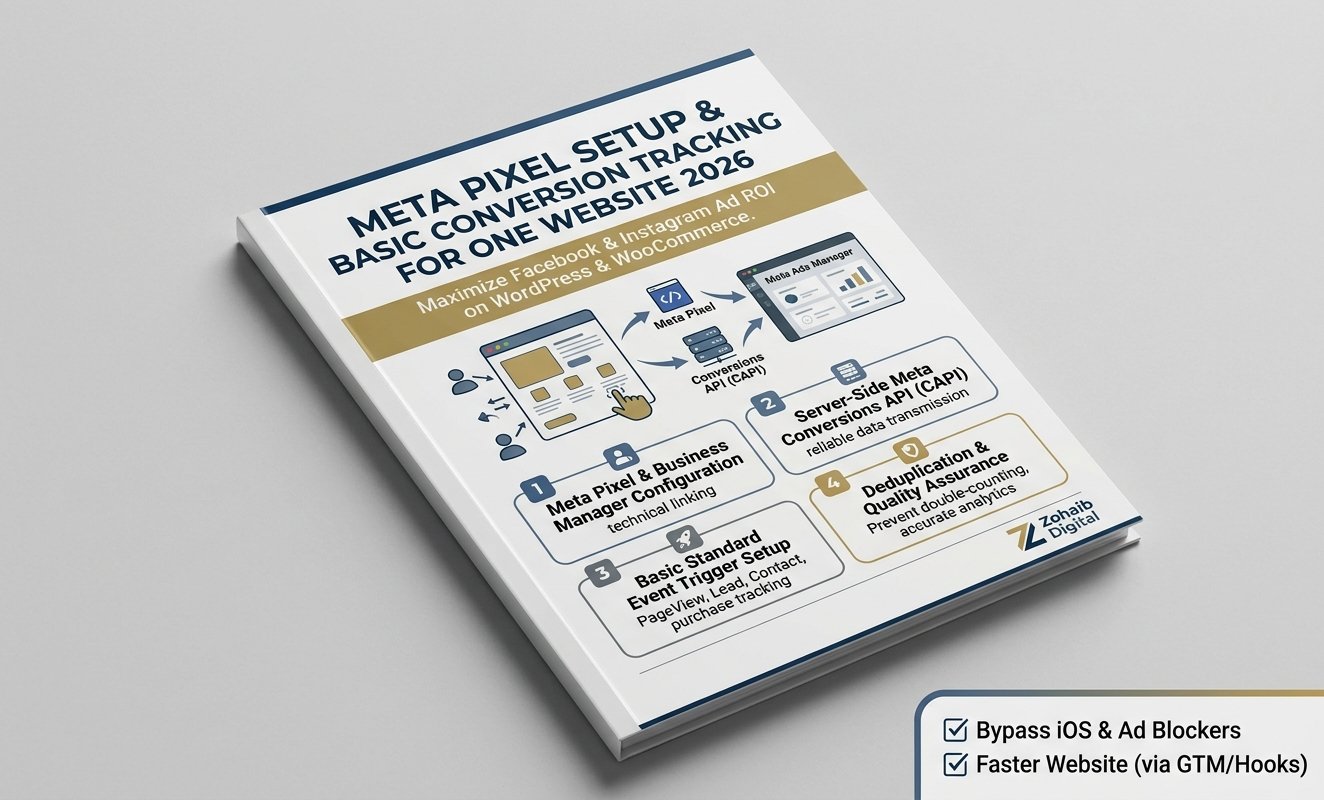
Meta Pixel Setup & Basic Conversion Tracking for One Website: Maximize Facebook & Instagram Ad ROI
Meta Pixel Setup & Basic Conversion Tracking for One Website is a specialized Facebook and Instagram tracking implementation service designed to deliver accurate conversion attribution, custom audience building, and reliable ad performance metrics for your online business. Running Facebook or Instagram ad campaigns without a properly configured Meta Pixel (formerly Facebook Pixel) and Conversions API (CAPI) leads to unmonitored ad spend, missing lead data, and inaccurate Cost Per Acquisition (CPA) reporting.
Modern iOS privacy updates and browser ad-blockers routinely prevent standard browser-based pixels from firing correctly. Our Meta Pixel Setup & Basic Conversion Tracking for One Website package solves this by implementing both browser-side Meta Pixel triggers and server-side Meta Conversions API (CAPI) on your single WordPress website or WooCommerce store, guaranteeing reliable data transmission directly to Meta Ads Manager.
Why Server-Side Meta Pixel & Conversions API (CAPI) is Vital
Relying solely on traditional browser-based pixel scripts results in losing up to 30% of conversion tracking data due to Safari ITP restrictions, iOS privacy permissions, and ad-blocking extensions. Combining Meta Pixel with server-side Conversions API ensures every high-intent action—such as lead form submissions, phone calls, or purchases—is captured accurately.
Core Business & Advertising Benefits
-
Accurate Ad Conversion Attribution: Match Facebook and Instagram ads directly to generated leads, contact inquiries, and WooCommerce orders.
-
Bypass iOS Privacy & Ad Blockers: Server-side Meta Conversions API (CAPI) sends data directly from your web server to Meta’s servers, restoring lost conversion signals.
-
Higher Quality Custom & Lookalike Audiences: Build precise retargeting audiences and high-converting Lookalike Audiences (LLAs) based on verified page visitors and lead submitters.
-
Lower Cost Per Lead (CPL) & Acquisition (CPA): Accurate event feedback trains Meta’s machine learning algorithm to show your ads to users most likely to convert.
-
Asynchronous Tag Container Setup: Configured through Google Tag Manager (GTM) or lightweight native hooks, protecting your website speed and Core Web Vitals.
What is Included in Your Meta Pixel Tracking Package?
(Mobile-Friendly Responsive Cards Display)
📌 Component 1: Meta Pixel & Business Manager Configuration
-
Technical Scope: Creation and linking of Meta Pixel ID with your Facebook Business Manager and target website domain.
-
Value Delivered: Establishes a verified, secure tracking foundation between Meta Ads Manager and your portal.
🔄 Component 2: Server-Side Meta Conversions API (CAPI)
-
Technical Scope: Server-to-server tracking configuration to back up browser pixel events against ad-blockers and iOS restrictions.
-
Value Delivered: Restores missing conversion data and improves Meta Event Match Quality (EMQ) scores.
⚡ Component 3: Basic Standard Event Trigger Setup
-
Technical Scope: Configuration of key standard events (
PageView,Lead,Contact, orViewContent) via Google Tag Manager or direct integration. -
Value Delivered: Tracks high-value user actions across your landing pages and lead forms accurately.
🛡️ Component 4: Deduplication & Quality Assurance
-
Technical Scope: Setup of unique event IDs to prevent double-counting when browser pixel and server CAPI fire simultaneously.
-
Value Delivered: Ensures clean, unpolluted analytics and accurate Return on Ad Spend (ROAS) figures.
Step-by-Step Meta Tracking Implementation Framework
Our digital agency follows a systematic 4-phase technical workflow to deploy and test your Meta tracking infrastructure:
[Phase 1: Business Manager & Pixel Audit] ──> [Phase 2: Tag Container & CAPI Setup] ──> [Phase 3: Event Trigger Engineering] ──> [Phase 4: Deduplication & QA Verification]
-
Business Manager & Pixel Audit: We review your Meta Business Manager permissions, verify domain ownership, and generate your dedicated Meta Pixel tracking ID.
-
Tag Container & CAPI Setup: We deploy your tracking container via Google Tag Manager (GTM) or lightweight native plugins, establishing server-side Conversions API pathways.
-
Event Trigger Engineering: We map out your target conversion actions (Forminator lead form submissions, button clicks, or pageviews) and build custom event triggers.
-
Deduplication & QA Verification: We run live event diagnostic tests using Meta Pixel Helper and Meta Events Manager Test Events tool to confirm event deduplication and match quality scores.
Common Meta Pixel Tracking Mistakes to Avoid
When setting up Facebook ad tracking, business owners and inexperienced developers frequently make technical configuration errors that distort ad analytics. Here are key mistakes our Meta Pixel setup & basic conversion tracking for one website package prevents:
-
Skipping Server-Side Conversions API (CAPI): Relying only on browser pixels causes significant data loss from iOS 14.5+ users and ad-blocker extensions.
-
Missing Event Deduplication: Failing to configure
event_idparameters causes Meta to count every conversion twice, artificially skewing ad performance metrics. -
Hardcoding Scripts in Theme Headers: Direct theme file script modifications slow down page rendering and risk getting erased during theme updates.
-
Unverified Domain Aggregated Event Measurement: Neglecting domain verification in Meta Business Manager prevents proper ad campaign optimization.
For official documentation regarding search engine web guidelines, mobile usability, and technical indexing standards, consult resources on Google Search Central Documentation.
Frequently Asked Questions (FAQs)
Why do I need both Meta Pixel and Conversions API (CAPI)?
Meta Pixel tracks actions in the user’s browser, while Conversions API tracks them directly from your web server. Using both ensures maximum data accuracy and overcomes browser ad-blockers and iOS privacy restrictions.
Will adding the Meta Pixel slow down my WordPress site?
No! We deploy your tracking container using asynchronous scripts via Google Tag Manager or lightweight hooks, ensuring zero impact on visual page rendering or Google PageSpeed scores.
Which basic conversion events are included in this package?
This package includes full setup for baseline tracking—including PageView and up to 2 primary standard conversion events such as Lead (form submissions) or Contact (click-to-call/WhatsApp button taps).
Explore Our Complementary Digital Growth Packages
Combine your Meta tracking setup with our specialized technical and growth services to build a high-converting digital marketing funnel:
-
Services Hub: Browse our complete catalog of WordPress development, web design, and search engine optimization packages.
-
Analytics & Growth Services: GA4 conversion tracking, Google Tag Manager configurations, and custom reporting.
-
Website Services: Custom WordPress development, Elementor Pro templates, and page speed optimization.
-
On-Page SEO Services: Complete multi-page search engine optimization, content structuring, and meta updates.
-
Technical SEO Services: Site speed enhancements, crawl budget optimization, and canonical tag audits.
-
Content Writing Services: High-converting sales page copywriting and search-optimized blog publishing.
-
WordPress Error Fixing: Rapid emergency resolution for site crashes, broken layout templates, and plugin errors.


Reviews
There are no reviews yet.